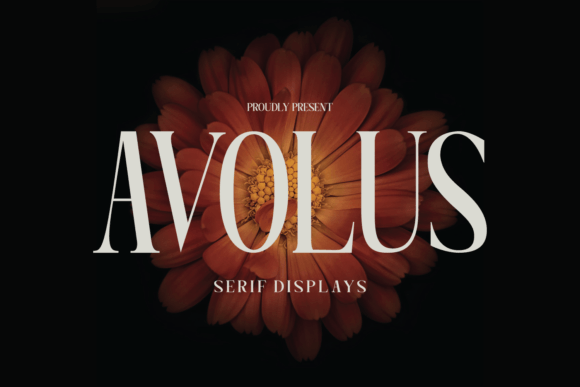
Avolus: Integrating a Modern Display Font into Your Creative Workflow
In the landscape of digital design, typography is rarely just an afterthought; it is the structural backbone of visual communication. For designers, marketers, and content creators, selecting the right typeface is a critical decision that influences brand perception, readability, and emotional resonance. Avolus emerges as a compelling option in this space, offering a cool display font characterized by a modern and unique style. Its versatility allows it to bridge the gap between artistic expression and functional clarity, making it a valuable asset for a wide range of projects.
Understanding how to effectively integrate Avolus into your workflow requires more than just installing the font file. It involves recognizing where it fits within the broader design process, from initial concept development to final output. Whether you are crafting wedding invitations, designing social media assets, or developing brand identity materials, knowing how to leverage Avolus can streamline your creative execution and enhance the quality of your deliverables.
Defining the Role of Avolus in Design Projects
Avolus is not a utility font meant for long-form body text. Instead, it serves as a display typeface, designed to capture attention and set the tone for a piece. Its modern aesthetic makes it suitable for contemporary brands and personal projects alike. When planning a design project, identifying the role of your typography early in the process is essential. Avolus functions best as a primary headline element or a focal point in layouts where visual impact is prioritized over dense information delivery.
Before beginning any design task, assess the emotional goal of the project. Avolus carries a distinct personality—clean yet expressive. This makes it ideal for contexts that require a balance of professionalism and creativity. For instance, in corporate branding, it can soften rigid structures, while in personal stationery, it adds a layer of sophistication without appearing overly formal. By defining this role upfront, you avoid the common pitfall of forcing a display font into unsuitable applications, such as paragraphs or small captions, where its unique features might hinder legibility.
Pre-Production: Planning and Compatibility Checks
Successful implementation begins with preparation. Before incorporating Avolus into a major campaign or client project, verify its compatibility with your existing toolset. Most modern design software, including Adobe Creative Cloud applications, Canva, and Affinity Designer, support standard font formats. However, checking rendering performance on different operating systems ensures consistency across devices.
- Software Integration: Ensure the font files are properly installed and activated in your design environment. Test kerning and spacing settings, as display fonts often require manual adjustment to achieve optimal visual balance.
- Brand Alignment: Review your brand guidelines or project brief. Does the modern style of Avolus align with the established visual identity? If you are working with an existing brand, consider how Avolus complements or contrasts with secondary typefaces.
- Licensing Verification: Confirm the licensing terms for your intended use. Commercial projects, such as product packaging or paid advertisements, may require specific licenses different from personal use cases like wedding invitations.
This preparatory phase minimizes disruptions during the active design stage. By addressing technical and legal considerations early, you create a smoother workflow that allows you to focus on creativity rather than troubleshooting.
Execution: Applying Avolus Across Different Mediums
Once the planning phase is complete, the practical application of Avolus begins. Its versatility shines in various mediums, each requiring slightly different handling techniques to maximize effectiveness.
Social Media and Digital Marketing
In the fast-paced environment of social media, capturing attention within seconds is crucial. Avolus excels in creating eye-catching posts for platforms like Instagram, Pinterest, and LinkedIn. When designing these assets, use the font for short, impactful headlines or quotes. Pair it with high-quality imagery or minimalistic backgrounds to let the typography stand out.
For digital marketing campaigns, consistency is key. Use Avolus consistently across banner ads, email headers, and landing page hero sections. This reinforces brand recognition and creates a cohesive user experience. Remember that screen resolution varies, so test your designs on multiple devices to ensure the font remains crisp and readable.
Print Materials and Stationery
Print design offers a tactile dimension that digital media lacks. Avolus is particularly effective in creating gorgeous wedding invitations and beautiful stationary art. In these contexts, the font’s unique style adds a touch of elegance and personalization. When preparing files for print, pay close attention to resolution and color profiles. Convert your design to CMYK and ensure the font is outlined or embedded to prevent substitution issues at the printer.
Consider pairing Avolus with a simple, neutral serif or sans-serif font for body text on invitations. This contrast enhances readability while allowing Avolus to serve as the decorative highlight. Experiment with letter spacing and size to create hierarchy, guiding the reader’s eye through the important details of the event or message.
Brand Identity and Packaging
For entrepreneurs and small business owners, brand identity is a long-term investment. Avolus can serve as the cornerstone of a logo or packaging design. Its modern look appeals to contemporary audiences, making it suitable for industries such as fashion, tech, lifestyle, and wellness. When using Avolus in logos, consider customizing certain letters or ligatures to create a unique mark that distinguishes your brand from competitors.
On packaging, space is often limited. Use Avolus for product names or key selling points, ensuring it stands out against other design elements. Maintain sufficient white space around the text to prevent clutter and enhance visual appeal.
Workflow Integration and Efficiency Tips
Integrating a new font into your routine should enhance efficiency, not complicate it. Here are practical strategies to streamline your use of Avolus:
- Create Template Libraries: Develop reusable templates in your preferred design software that feature Avolus as the primary headline font. Save these with predefined styles, colors, and spacing settings. This reduces setup time for recurring projects like social media posts or client proposals.
- Establish Pairing Guidelines: Identify two or three complementary body fonts that work well with Avolus. Document these pairings in a style guide. Having pre-approved combinations speeds up the decision-making process and ensures typographic harmony across all materials.
- Use Style Sheets: In web design or document creation, define CSS classes or paragraph styles for Avolus. This ensures consistent application of size, weight, and color, reducing manual adjustments and maintaining quality control.
By systematizing the use of Avolus, you transform it from a mere asset into a reliable component of your design infrastructure. This approach supports scalability, allowing you to handle higher volumes of work without sacrificing quality.
Quality Control and Long-Term Use
Maintaining high standards requires ongoing evaluation. Regularly review projects where Avolus was used to assess its performance. Did it achieve the desired impact? Was it readable in all contexts? Gather feedback from clients or users to identify areas for improvement.
As trends evolve, so too should your application of typography. While Avolus has a timeless modern quality, staying aware of design shifts helps you keep your work fresh. Consider experimenting with new layouts, color schemes, or compositional techniques to keep the font feeling contemporary. Additionally, keep your font files organized and backed up. Proper file management ensures that you can access Avolus quickly whenever a new project arises, preventing delays caused by missing assets.
Ultimately, the value of Avolus lies in its ability to adapt to your needs. Whether you are a freelancer managing multiple clients, a marketer launching a campaign, or a hobbyist creating personal art, this font offers the flexibility and style required to produce professional-grade results. By approaching its use with intention and structure, you elevate both your workflow and your final output.
For those looking to expand their typographic toolkit, exploring Avolus provides an opportunity to refine your design process. It is not just about choosing a font; it is about understanding how that choice interacts with your goals, your audience, and your methods. With careful planning and consistent application, Avolus becomes more than a design element—it becomes a strategic advantage in your creative endeavors.